What you can and can't do.
When you’re building a NetSuite SuiteApp, you’re not just shipping a feature — you’re extending the experience of a highly structured, enterprise-grade platform. That means every UI decision you make has ripple effects. Will this survive an upgrade? Will it confuse users? Will it break if NetSuite updates their DOM?
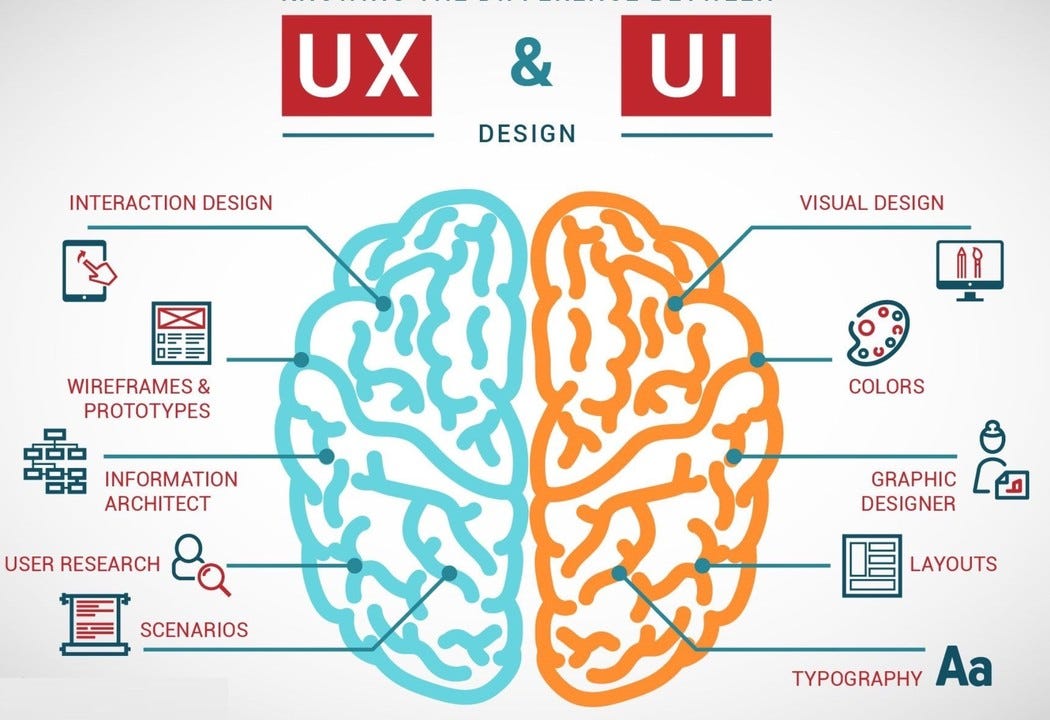
One of the most important distinctions we emphasize at ExtendApps — and what the SAFE Guide backs up — is the difference between UI and UX. Knowing that difference helps you design better apps, avoid tech debt, and build with confidence inside the NetSuite ecosystem.
Let’s break it down.
UI vs. UX in SuiteApp Design
In standard web design, UI and UX sometimes blur. In NetSuite, that blur can lead to problems.
User Interface (UI) is what you build: the fields, buttons, forms, and components that users interact with.
User Experience (UX) is how the user feels when using it: the flow, the clarity, the trust, the efficiency.
You can absolutely build a clean UI that still delivers a frustrating UX if it ignores NetSuite conventions — and vice versa. The best SuiteApps make both work in tandem.
Example:
A custom inline editor that mimics Excel might seem like a UX win. But if it breaks keyboard navigation or disables NetSuite’s audit logging, you’ve just sacrificed functionality — and user trust — for “slickness.”
What NetSuite Expects From a SuiteApp
NetSuite isn’t a blank canvas. It’s a governed platform with specific expectations around:
Maintainability
Security
Upgrade compatibility
Platform consistency
That’s why Oracle provides the SAFE Guide — a blueprint for building SuiteApps that not only work today, but survive tomorrow’s release.
If you’re building under the SuiteCloud Developer Network (SDN) or distributing your app via SuiteApp.com, compliance with SAFE principles isn’t optional — it’s required.

Core Requirements from the SAFE Guide
The SAFE Guide outlines a few fundamental architectural principles that should shape how we approach SuiteApp UI and UX:
1. Use Supported Extension Points
Avoid hacking around NetSuite’s UI or DOM. Instead, build through:
Suitelets and Portlets
SuiteScript UI Modules (N/ui/serverWidget)
SuiteCommerce extensions
Form/field customization APIs
CMS placeholder hooks (SuiteCommerce)
These tools are built to last — and NetSuite guarantees compatibility through upgrades.
2. Don’t Touch Internal DOM or CSS
This is where UI hacks become UX liabilities.
SAFE makes it clear:
“SuiteApps must not rely on the structure or class names of NetSuite’s internal DOM or CSS, as these may change without notice.”
That means:
No getElementById('custpage_randomid') selectors unless you created the ID.
No overwriting .uir-button-primary styles globally.
No assumption that layout divs or input wrappers will stay the same.
Instead, use your own injected containers and scope your CSS/JS strictly to them.
3. Encapsulate and Namespace Everything
Your SuiteApp runs alongside dozens of others. SAFE requires that your code plays nicely:
Prefix all CSS classes (.ea-timesheet-panel, not .panel)
Avoid global JavaScript objects
Scope events to your components
Bundle external libraries properly (don’t leak jQuery 2.0 into a page running jQuery 3.0)
This isn’t just about etiquette — it’s about long-term reliability.
4. Respect the NetSuite UX
Yes, you can innovate. But SAFE pushes for platform alignment first.
Match NetSuite’s form layout conventions
Use native components (dropdowns, sublists, field groups) wherever possible
Avoid modal-heavy workflows or SPA-style routing that breaks navigation
You’re not building your own app on top of NetSuite — you’re extending NetSuite itself. The best UX you can offer is one that feels native.
5. Design for Upgrades
Your SuiteApp should continue working without changes across NetSuite’s semi-annual release cycle.
To do that:
Use SuiteScript 2.1 (modern, safer, and more modular)
Avoid deprecated APIs (nlapiLoadRecord, etc.)
Regularly test in NetSuite beta environments or preview accounts
Don’t rely on implementation-specific workarounds — what works in Account A may not work in Account B
Testing: Designing for Reality, Not Just the Sandbox
In NetSuite, testing isn’t just a QA step — it’s part of good UX. A SuiteApp that looks great but breaks after a release, behaves differently across accounts, or fails under real user workflows creates friction and erodes trust fast.
The SAFE Guide reinforces a simple idea: if you don’t test against the platform as it evolves, you’re not building an upgrade‑safe SuiteApp.
What to Test (and Why It Matters)
1. Upgrade Compatibility
NetSuite upgrades twice a year, and internal UI structures can change without notice. Testing in preview or beta accounts helps catch:
Reliance on deprecated APIs
Fragile DOM or CSS assumptions
Behavioral changes in native components
If your UI or UX changes after an upgrade, that’s a SAFE red flag.
2. Account Variability
No two NetSuite accounts are the same. Custom forms, scripts, roles, and permissions all affect how your SuiteApp behaves. Testing across multiple sandbox configurations ensures:
Fields and buttons appear when expected
Permission checks don’t break flows
UX remains predictable for different roles
3. Real User Workflows
Good UX isn’t tested by clicking around once. Validate complete workflows:
Create → edit → save → approve → delete
Error handling and edge cases
Keyboard navigation and accessibility paths
If users can’t complete their task smoothly, the UI doesn’t matter.
4. Performance and Load Behavior
Slow load times, flickering UI, or blocking scripts degrade the experience — even if the UI is technically correct. Test:
Initial render time for Suitelets and forms
Client script execution timing
Impact of third‑party libraries
Performance issues are UX issues.
Post-Launch Success
Finally, your SuiteApp goes live — but that’s just the beginning. True post-launch success comes from analytics and iteration: tracking adoption, monitoring real-world behavior, and identifying friction points through user data. By closing the feedback loop, you can prioritize meaningful enhancements and continuously improve UX while staying SAFE-compliant and upgrade-ready.
The Bottom Line
In NetSuite development, UX is not just about delight — it’s about trust. The SAFE Guide provides the architectural baseline to build SuiteApps that are not only usable and intuitive, but also sustainable and scalable.
At ExtendApps, we build like we’re part of NetSuite — because that’s what makes the experience seamless for our users.
Written by
ExtendApps
Category
NetSuite SuiteApps